For owners weighed down by booking-site fees and one-time stays
With the guests who stayed, a connection to meet again.
Grow direct bookings yourself.
Record what guests enter themselves through the room QR or guest register, property by property. Email thank-yous and seasonal news to guests who agreed to receive them, and send them straight to your own booking page.
Online payments: Stripe fee 3.6% only (excluding consumption tax).
Sign up with just an email address and a password
- Property setupBy you
- Free plan¥0 / month
- Free sign-upNo card needed
Do any of these sound familiar?
When several guests stay together, you still can't reach anyone but the person who booked
Each guest enters their own register and contact details. With their consent, you can email the other guests too
Bookings keep coming in, but less is left than you expected once the fees come out
Take new direct bookings on your own page. Yadora’s booking fee is ¥0 for all payment methods
A guest says they'd love to come back, and you have no way to reach them afterward
Email thank-yous, coupons and seasonal offers to guests who agreed to hear from you
When a booking arrives, you can't tell whether the guest has stayed before
Your connection with guests shows how many times each guest stayed, with their history
Someone asks to book direct, and you have no booking page to send them to
Even on the Free plan, you can publish your own booking page
If even one of these is you, Yadora can help.
Sign up with just an email address and a password
How a guest who stayed once comes back
Record guests, send them news, and take bookings on your own page. One service keeps that cycle going.
- Stay
- Connection with guests
- Your own offers
- Booking page
Each return stay adds to your connection with guests.
Record your connection with guests
Keep the register entries and contact details guests enter themselves, together with their stay history, for each property. You can see who to contact next.
Send thank-yous, coupons and seasonal offers
Choose who to reach and what to send: a thank-you, a coupon, a seasonal campaign. On Pro, thank-you and birthday emails go out automatically on the schedule you set.
Take bookings on your own page
Link emails to your property’s published booking page. Review responses and booking results through dedicated campaign links to help plan your next campaign.
Marketing messages require an eligible contact source, a permitted purpose and the recipient’s own consent. Roster submission alone is not marketing consent. Unsubscribes are also managed.
Free plan: ¥0 per month
Start with one property, free.
No credit card needed.
Three things you can do with Yadora
Every screen below is the real product with sample data.
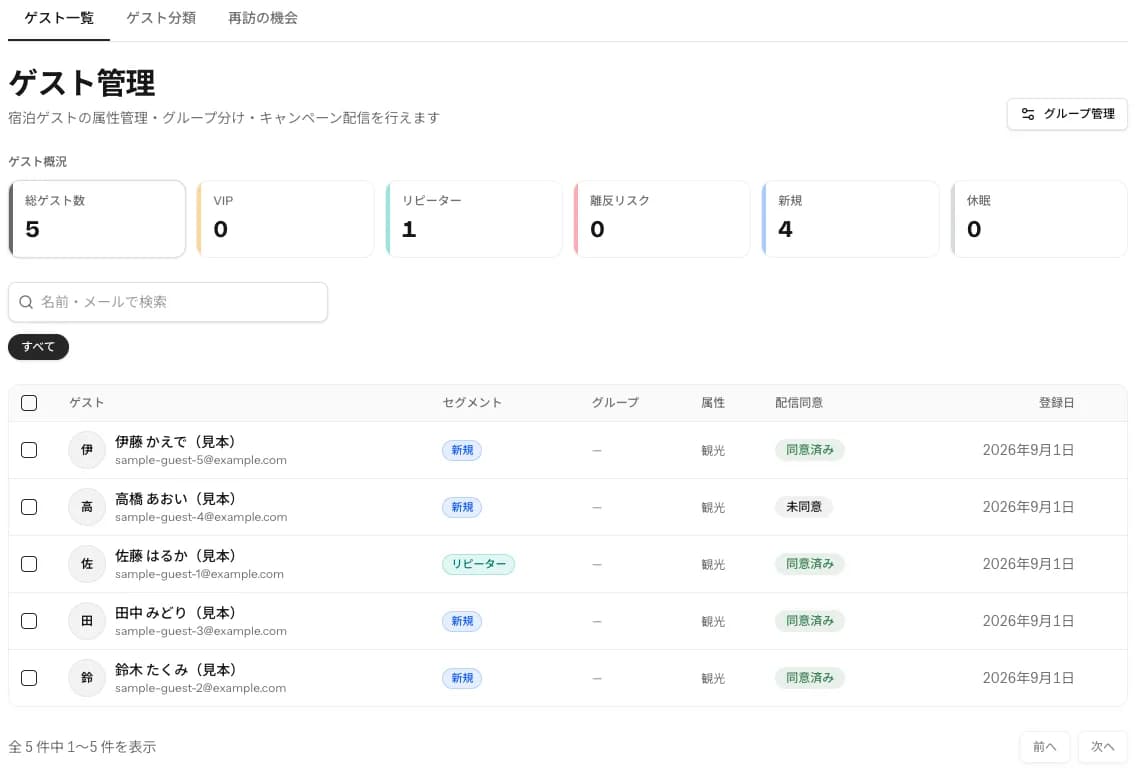
POINT1
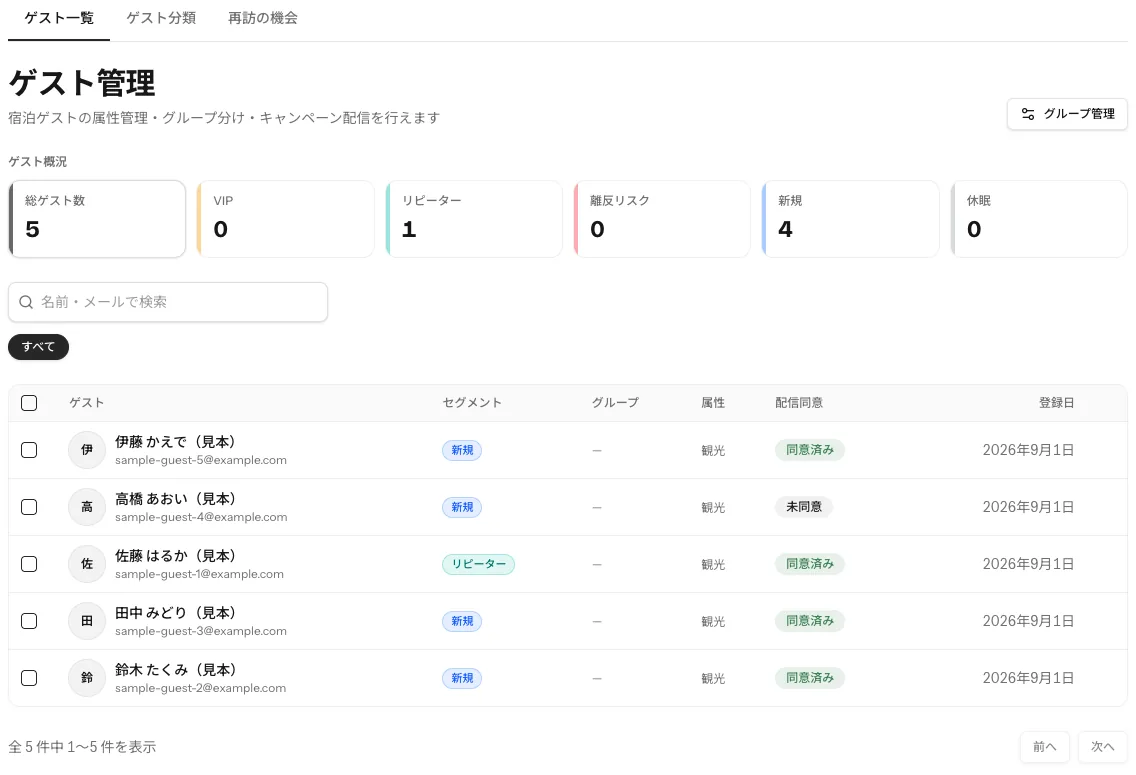
See at a glance who stayed, and how often
Review property-specific guest records to plan future service and outreach. Segment counts differ from the number of recipients who meet consent and other delivery requirements.
- Counts of repeat, new and lapsed guests
- Whether each guest agreed to receive email
- Segments and stay history
POINT2
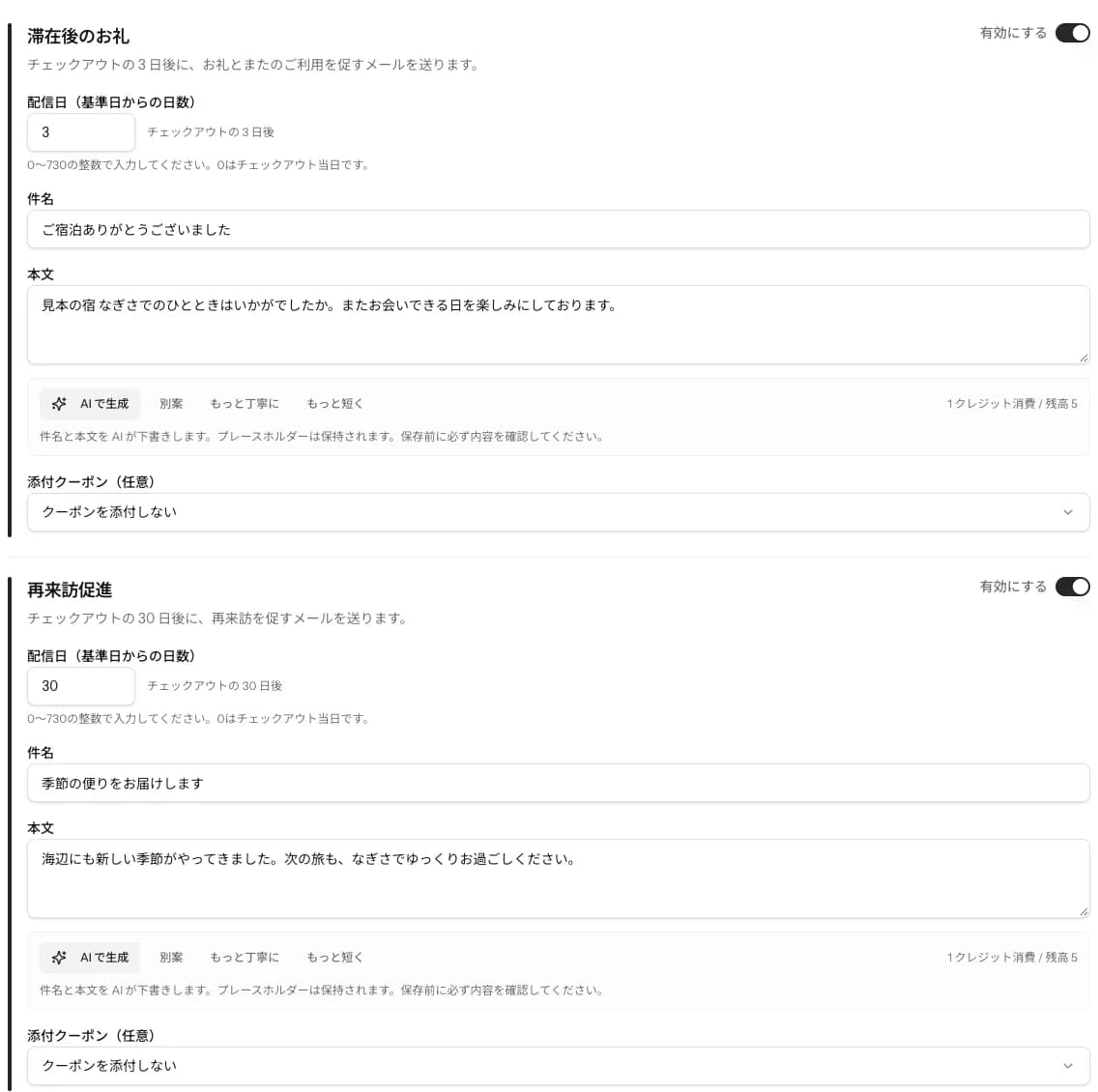
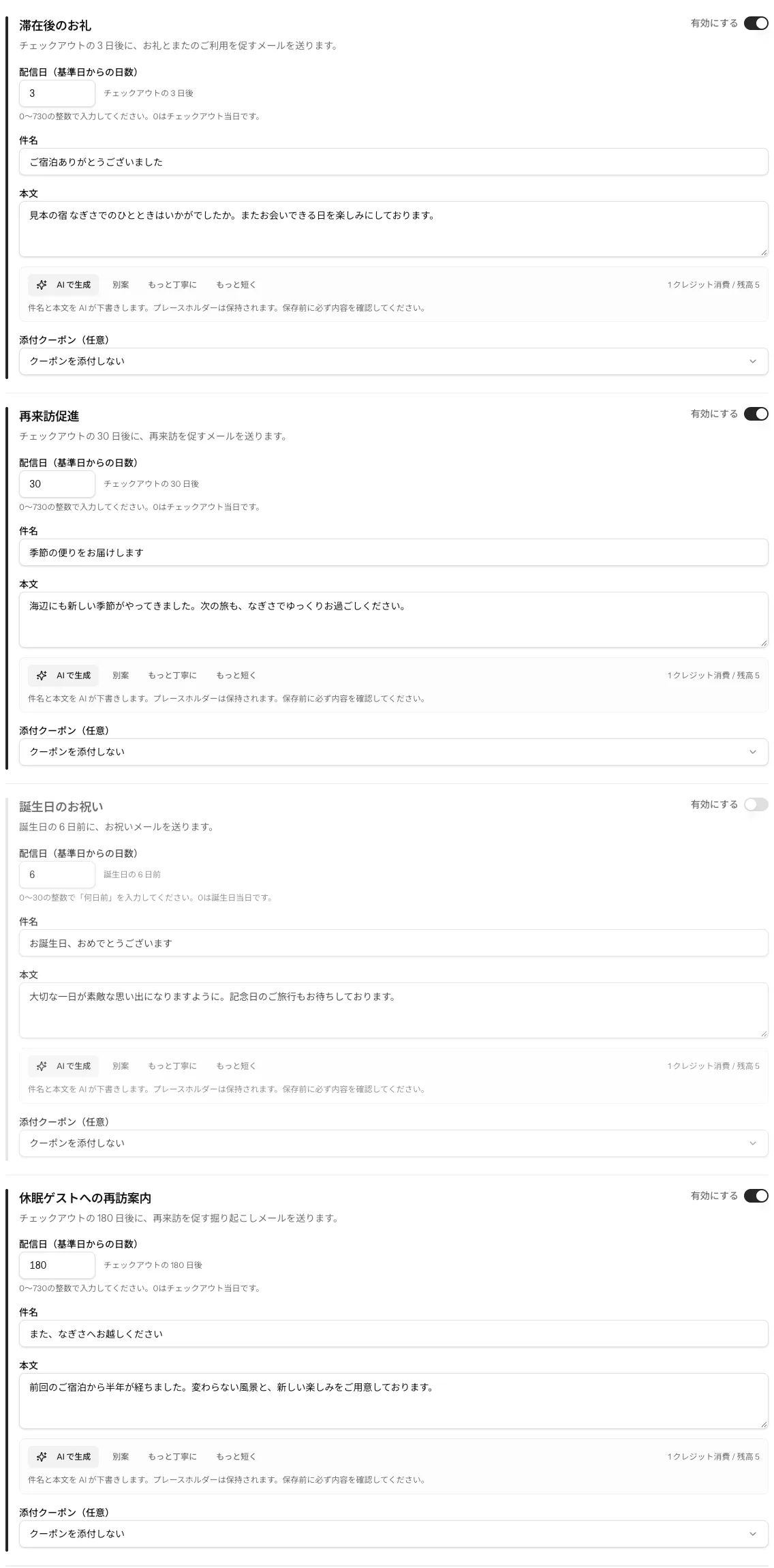
Thank-yous and return offers arrive on schedule
With Pro, set email timing and wording for recipients who meet consent and delivery requirements. Unsubscribe choices are respected.
- Four kinds, including thank-you, return and birthday
- You set the timing and the wording
- Unsubscribes are applied automatically
POINT3
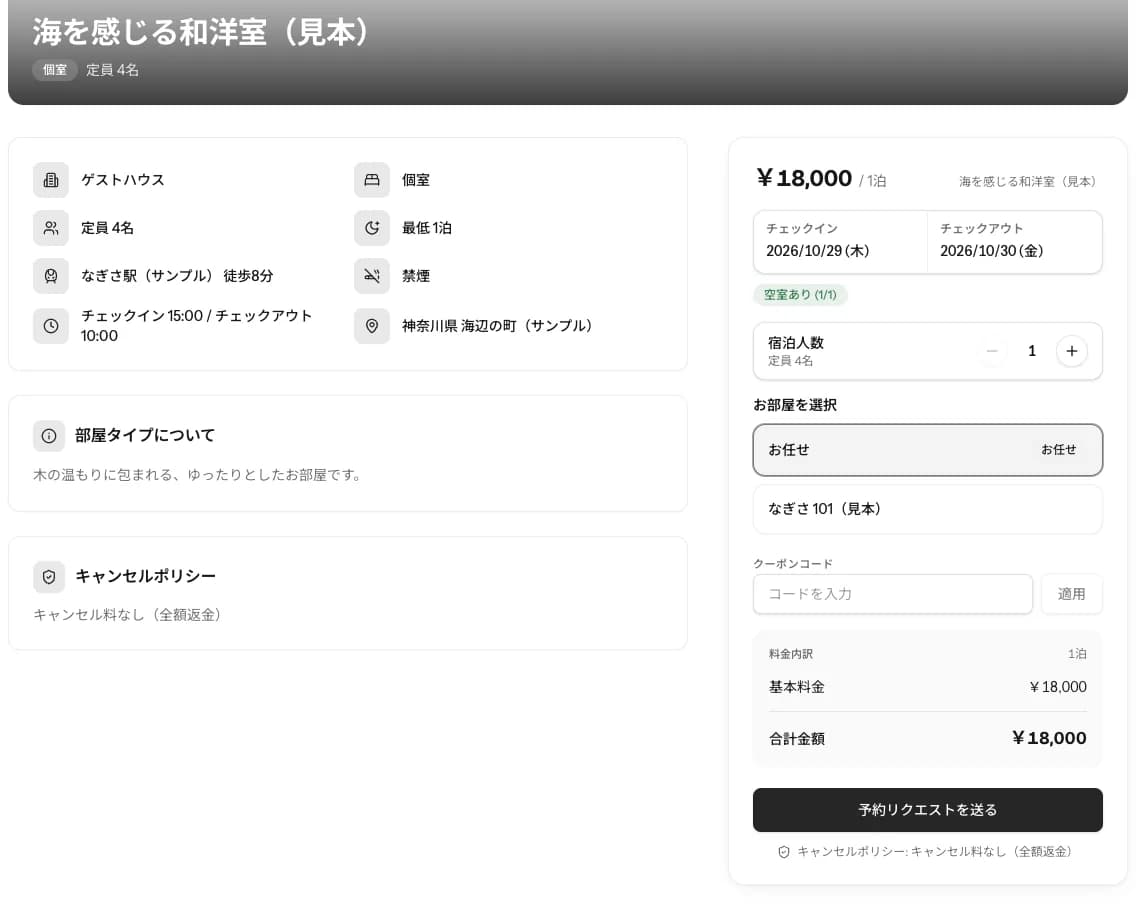
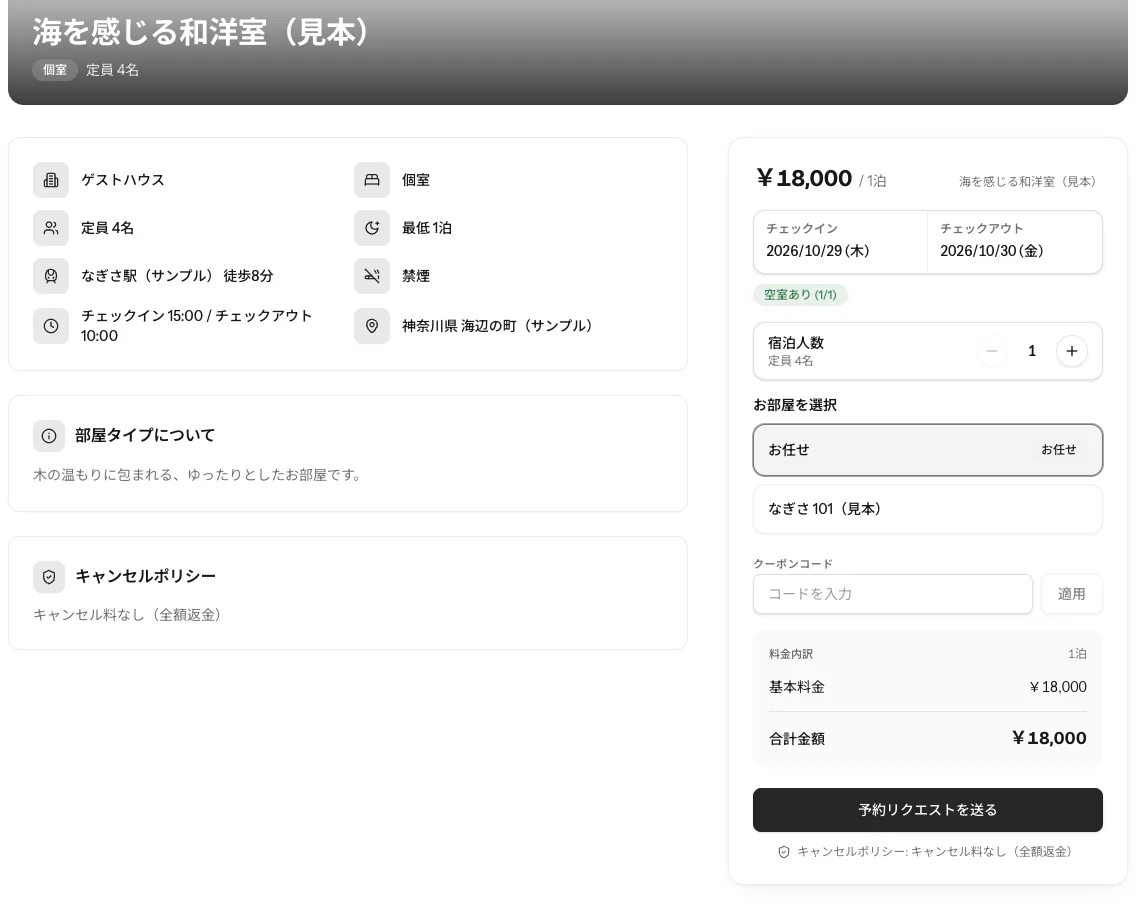
Guests who read your offer can book right away
Guests can check availability and start a reservation from your property’s public booking page. Prepare publishing settings, rates, availability and other booking requirements first.
- Availability and rates shown on the spot
- Booking straight from a phone
- No app to install
You register it yourself
Add your property and rooms by following the on-screen guidance.
We can also walk you through the steps on our official LINE account.
From bookings to cleaning, daily work in one place
Keep reservations, guest rosters and cleaning checks together as you handle the day’s work. Operational tools support the ongoing work of building guest relationships.
- Booking
- Check-in
- During the stay
- Check-out
1Booking
Guest
Checks availability and rates on your booking page, then books
Property
Confirm the booking and availability
2Check-in
Guest
Gets check-in instructions automatically and fills in the guest register by phone
Property
Check-in instructions go out automatically. Review the register that comes in
3During the stay
Guest
Joins Wi-Fi from the room QR, reads the house guide and orders extra services
Property
Handle the orders that come in
4Check-out
Guest
Checks out
Property
Assign cleaning and review the completion report
- Reservations, inventory and rates
- Organize properties, room types, rooms and beds. OTA reservation calendars are fetched periodically using iCal. Syncs can be delayed, so check their status.
- Guest rosters and Wi-Fi guidance
- Includes guest roster forms for Japan's Hotel Business Act. Guests enter roster details on their phone. Offer Wi-Fi access through a room QR or a reservation’s six-digit code. Sensitive details such as passport numbers are encrypted.
- In-stay guidance and service orders
- Provide property information and additional service orders on guests’ phones. Guest AI chat is in Beta, with access, setup and AI credit requirements.
- Cleaning tasks and staff management
- Share assignments, checklists and photo-backed completion reports. Track cleaning compensation with property-specific staff permissions.
- Guest information and access controls
- Use host-scoped access controls and encryption for sensitive roster details and Wi-Fi passwords. Manage messaging consent and unsubscribe requests.
- AI-assisted operational reviews
- AI operations reports use reservation and operations data to suggest improvements. Treat reports as advice and review actions before carrying them out. AI credits apply.
How we protect the information you entrust to us
As a service that handles guests' personal information, we apply the following security measures.
All stored data is encrypted. Passport numbers and guest registers are additionally encrypted field by field, so even if data were to leak, it cannot be read without the key.
- All stored data is encrypted
- The database and files such as photos are all stored encrypted on Google Cloud. Passport number and nationality, guest registers, Wi-Fi passwords and bank account details are additionally encrypted field by field with a separate key.
- Data separated by property
- All data is tied to the property owner, and other properties' data cannot be accessed. You can also limit which properties each staff member sees.
- Retention periods and deletion
- Temporary data such as logs is deleted automatically every day once its retention period ends. Guest registers are deleted after the three years required by law.
- Consent and unsubscribe management
- Offer emails go only to guests who agreed to receive them. Anyone can unsubscribe at any time from the link in the email.
- Weekly penetration testing
- We run AI-driven penetration tests every week to keep checking for weaknesses an attacker could use.
- Daily log review
- Our SRE team of AI agents reviews the logs every day for signs of attacks and unauthorized access, so suspicious access is detected and handled early.
You register your property yourself
Add your property and rooms by following the on-screen guidance.
If you are unsure how to proceed, we can walk you through it on our official LINE account.
Weekdays 10:00–18:00 Japan time (closed weekends, public holidays and the New Year period)
Create a free account
Sign up with just an email address and a password. No payment card is required.
Add your property and rooms
Follow the on-screen guidance to add your property, rooms and rates.
Set rates and availability
Set rates, availability and payment methods by following the on-screen guidance.
Publish your booking page
When you are ready, publish your property’s booking page and take direct bookings.
Two plans. Start on the free one
Both plans include reservations, guest rosters and Wi-Fi guidance. Pro adds automated outreach and website editing.
Free
Start with the essentials for one property.
- 1 property, 3 room types, 1 room per type
- Reservations, rosters, Wi-Fi and guest records
- Standard booking page and manual email
- 30 emails and 5 AI credits/month, per account
Pro
For automated guest outreachAutomate guest outreach and expand your operations.
- Unlimited properties, billed per property
- Edit booking page design and content
- Automated thank-you, return-stay and birthday emails
- AI campaign plans
- AI operations reports
- 1,000 emails and 100 AI credits/month, per account
14-day trial on your first Pro subscription
A payment card is required when starting Pro. Monthly billing begins after the trial. Cancel before your next renewal.
Both plans include reservations, rosters, Wi-Fi, staff, cleaning and calendar sync. Email allowances include operational notices such as booking confirmations. Email allowances and monthly AI credits are per account. Extra AI credits are sold separately.
For new accommodation bookings, Yadora’s platform fee is ¥0 for all payment methods. Online payments incur only Stripe’s standard 3.6% processing fee (excluding consumption tax). Refer to your Stripe statement for the actual fee.
Compare all plan features
| Feature | Free | Pro |
|---|---|---|
| Properties | Up to 1 | Unlimited |
| Room types per property | Up to 3 | Up to 10 |
| Rooms per room type | Up to 1 | Up to 20 |
| Beds per room | Up to 4 | Up to 12 |
| Photos per property | Up to 5 | Up to 20 |
| Reservations, rosters, Wi-Fi, basic CRM, staff, cleaning and iCal | Included | Included |
| Standard booking page | Included | Included |
| Manual email | Included | Included |
| Booking page design editing | Pro only | Included |
| 4 types of automated guest email | Pro only | Included |
| AI campaign plans | Pro only | Included |
| AI operations reports | Pro only | Included |
| Emails, including operational notices | 30/month | 1,000/month |
| AI credits | 5/month | 100/month |
Email allowances and monthly AI credits are shared across the account.
Monitors wanted: first 10
Try the Pro plan free for three months
We are taking the first 10 properties that apply as monitors. During the period you can use Pro features at no charge, with no credit card and no automatic billing afterward.
- Pro features free for 3 calendar months
- No credit card needed
- No automatic billing after the period ends
The application form (Google Forms) opens in a new tab. We'll review it and contact you.
Frequently asked questions
What can I use on Free?
Free supports one property, reservation and guest information management, guest roster entry and room Wi-Fi QR setup. It allows up to three room types with one room per type. The monthly allowance is 30 emails and 5 AI credits per account. No payment card is required.
Can I register the property myself?
Yes. After you create a free account, follow the on-screen guidance to add your property and rooms. If you are unsure how to proceed, we can walk you through it on our official LINE account (weekdays 10:00–18:00 Japan time, except weekends, public holidays and the New Year period).
Are website building and booking reception the same feature?
Free includes a public booking page with a standard layout where you can accept reservations. The site builder for editing design and content is included in Pro. Taking bookings requires publishing settings, rates, availability, payment methods and other preparation. Guests use their phone’s browser without a dedicated app.
Who can receive return-stay invitations?
Recipients must have an eligible contact source and a purpose that permits marketing use, along with their own consent, a valid address and other delivery requirements. Roster submission and marketing consent are managed separately, including unsubscribes. Check the terms of the service the reservation came through. iCal does not provide guest contact details.
What do I set up for automated emails?
Pro: Keep sending thank-you messages and return-stay invitations at the times you set. You control whether each of the four message types is enabled, when it sends and what it says: thank-you, return-stay, birthday and re-engagement emails. Targeted emails are also available. Delivery requires the recipient’s own consent, a valid address, an available email allowance and other conditions.
Can I review the results of my outreach?
Review responses and booking results through dedicated campaign links to help plan your next invitation. Measurement covers activity associated with those campaign links; it does not track every automated email through to a repeat booking.
Are there charges beyond the monthly plan?
For new accommodation bookings, Yadora’s platform fee is ¥0 for all payment methods. Online payments incur only Stripe’s standard 3.6% processing fee (excluding consumption tax). Refer to your Stripe statement for the actual fee. Extra AI credits are paid separately. The first 14-day Pro trial requires a card and switches to monthly billing after the trial.
Turn guests who stayed into your next direct booking.
Start free by registering your property and rooms. You add them yourself, following the on-screen guidance.